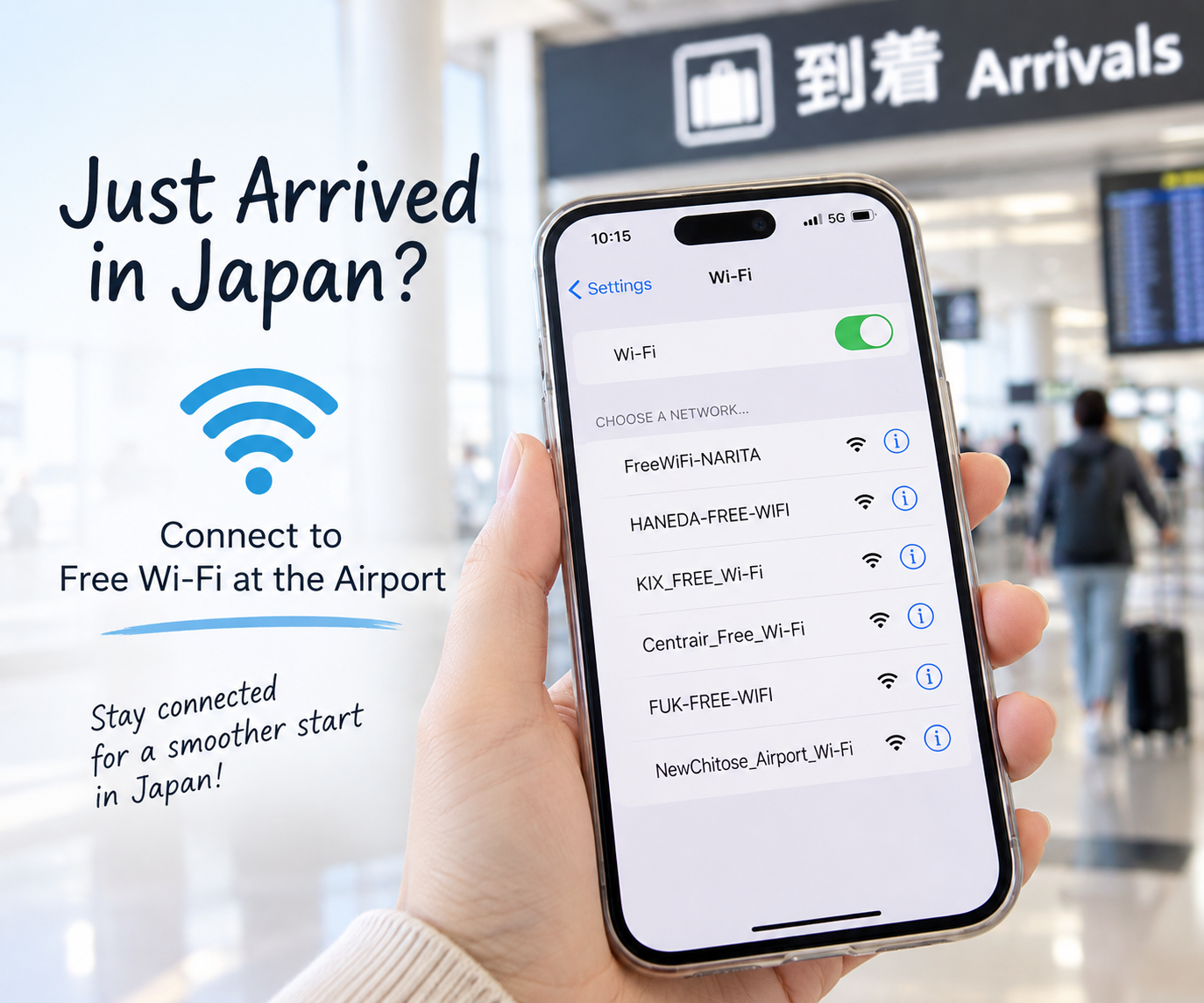
You’ve just arrived in Japan. Before figuring out trains, finding your hotel or new home, or contacting your family, there’s one thing that can make everything easier: getting online.
The good news is that major airports in Japan offer free Wi-Fi. In this guide, we’ll show you how to get connected after you arrive and what to do if the Wi-Fi doesn’t work.
Step 1: Turn On Wi-Fi
After arriving at the airport, open the Wi-Fi settings on your smartphone.
⚠️ Important: Turn Off Data Roaming
Airport Wi-Fi itself is free. However, if the Wi-Fi connection drops, your phone may automatically switch to mobile data.
If international data roaming is turned on, your mobile carrier may charge you.
To avoid unexpected charges, turn off Data Roaming or Mobile Data before using free Wi-Fi.
You should see several available networks. Look for the official free Wi-Fi network provided by the airport.
Tip: Avoid connecting to unfamiliar networks with names that simply look like airport Wi-Fi. Check the airport’s official information if you are unsure.
Step 2: Connect to the Airport’s Free Wi-Fi
Select the official airport Wi-Fi network.
A login or agreement page may appear automatically. Follow the instructions on the screen and accept the terms of use if required.
Once connected, open a website to make sure your internet connection is working.
Check Your Airport’s Official Wi-Fi Information
Free Wi-Fi is available at many major airports in Japan. The network name and connection method may differ depending on the airport.
If you are not sure which Wi-Fi network to use, check your airport’s official website before connecting.
Major Airports in Japan
- Narita International Airport (NRT) — Free airport Wi-Fi is available. Look for the official network FreeWiFi-NARITA.
Official information: Narita Airport – Wi-Fi & Internet Access - Haneda Airport (HND) — Free Wi-Fi is available in the passenger terminals.
Official information: Haneda Airport – Wireless LAN / Wi-Fi - Kansai International Airport (KIX) — Free Wi-Fi is available in the airport.
Official information: Kansai International Airport – Free Wi-Fi - Chubu Centrair International Airport (NGO) — Free Wi-Fi is available in the terminal.
Check the airport’s official website for the latest connection information.Chubu Centrair Airport – Free Wi-Fi - Fukuoka Airport (FUK) — Free Wi-Fi is available in the airport.
Check the airport’s official website for current Wi-Fi information.Official information: Fukuoka Airport – Free Wi-Fi - New Chitose Airport (CTS) — Free Wi-Fi is available in the terminal.
Check the airport’s official website for current connection information.New Chitose Airport – Free Wi-Fi
Tip: Airport Wi-Fi network names and connection procedures can change. Always check the official airport website if you are unsure which network is legitimate.
Step 3: Contact Your Family or Friends
Now you can send a message to let someone know you arrived safely.
You can also use the connection to check your accommodation details, email, translation apps, or other information you may need.
Step 4: Check Your Route Before Leaving the Airport
Before leaving the airport, use Google Maps or another navigation app to check how to reach your destination.
Take a screenshot of your route, hotel address, or home address. This can be useful if you temporarily lose your internet connection while traveling.
Step 5: Think About Internet Access After You Leave
Airport Wi-Fi is useful when you first arrive, but you will probably need another way to stay connected after leaving the airport.
Depending on how long you will stay in Japan, your options may include:
- eSIM
- SIM card
- Pocket Wi-Fi
- A Japanese mobile phone plan
- Free Wi-Fi at some public facilities and businesses
We’ll explain these options in separate Japan Life Steps guides.
What If the Airport Wi-Fi Doesn’t Work?
If you cannot connect, try turning Wi-Fi off and on again. You can also forget the network and reconnect.
If a login page does not appear, open your web browser and try visiting a website.
If you are still having trouble, look for an airport information counter and ask for help.
Your First Step in Japan
Arriving in a new country can feel overwhelming. You don’t have to figure out everything at once.
First, get connected. Then take your next step.
Welcome to Japan — and welcome to Japan Life Steps.
Information Note and Disclaimer
Information based on official sources available as of October 2026.
Airport Wi-Fi network names, connection procedures, coverage areas, operating conditions and availability may change without prior notice.
Free Wi-Fi connections may be unavailable, unstable or interrupted due to network congestion, maintenance or technical problems.
International roaming and mobile data charges depend on your mobile carrier and contract. Connecting to airport Wi-Fi does not automatically prevent mobile data charges.
For security, confirm the official Wi-Fi network name before connecting. Avoid entering sensitive personal or financial information on unfamiliar or unsecured networks.
Always check the latest Wi-Fi information on the airport’s official website and confirm international roaming charges with your mobile carrier before traveling.
Japan Life Steps is an independent information website and does not operate or guarantee airport Wi-Fi services.

コメント